Virtual Machine Auto Balance (Experimental)
Available as of v1.7.0
virtual-machine-auto-balance is an experimental add-on. For more information about experimental features, see Feature Labels.
The Virtual Machine Auto Balance add-on allows Harvester to leverage the Kubernetes Descheduler for rebalancing of virtual machine workloads. The Kubernetes Descheduler optimizes workload scheduling by evicting pods that are not optimally placed according to administrator-defined policies. This crucial function enhances resource utilization, balances workloads across nodes, and improves overall cluster performance.
Enabling the Add-on
When enabled, the add-on deploys the Descheduler in the kube-system namespace and a related configuration in the kube-system/descheduler ConfigMap. You can enable the add-on only when the cluster has more than one node.
-
On the Harvester UI, go to Advanced > Add-ons.
-
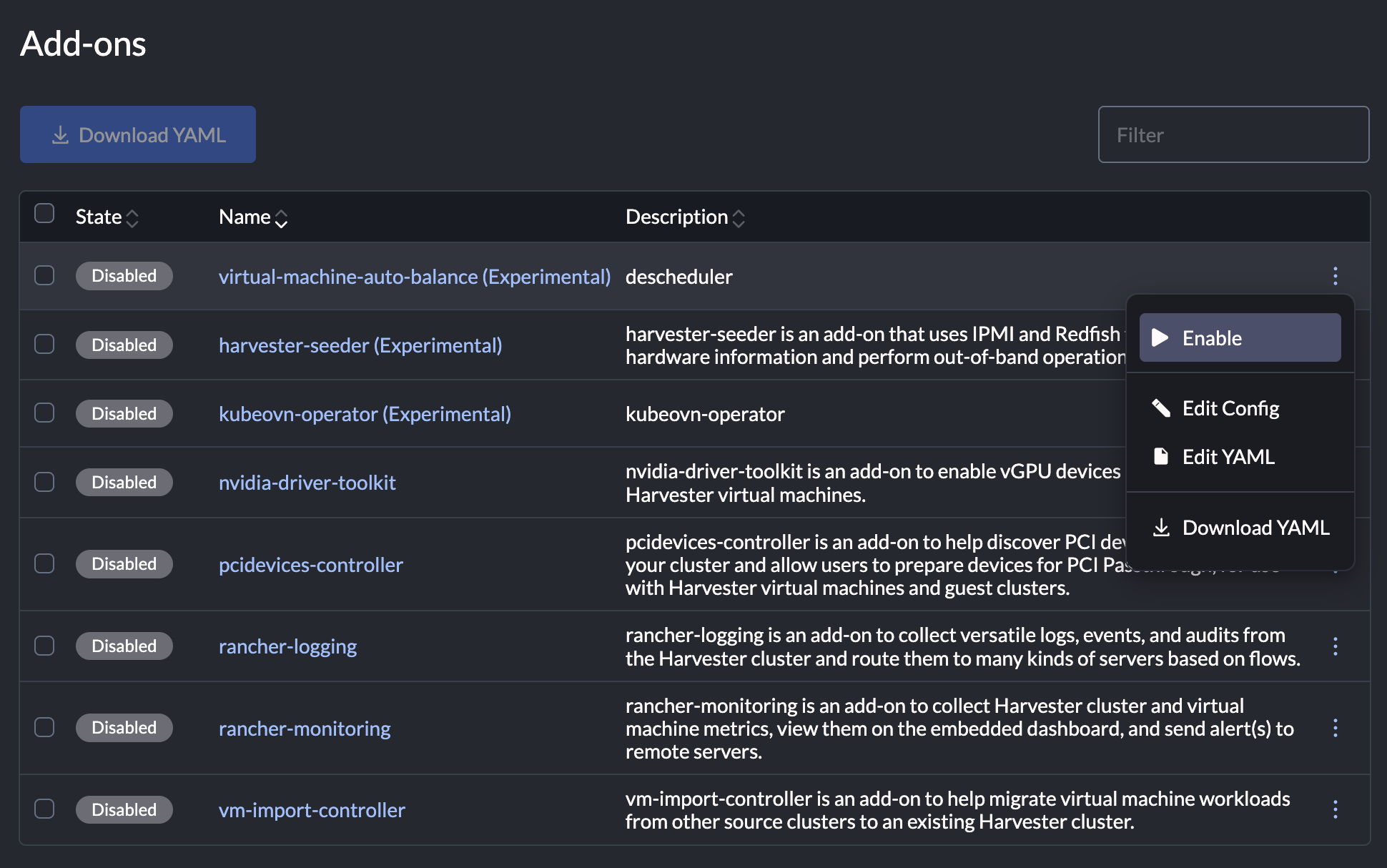
Select virtual-machine-auto-balance (Experimental), and then select ⋮ > Enable.
Descheduler Policies
The configuration contains the following plugins:
DefaultEvictor: Provides common eviction configuration at the top level.LowNodeUtilization: Monitors node resource usage and evicts pods from overutilized nodes to underutilized ones based on defined thresholds.
With the default configuration, the Descheduler only evicts virtual machine pods.
Customizing Descheduler Policies
Select ⋮ > Edit YAML to customize the Descheduler policies according to your requirements. The configuration is defined in YAML format.
apiVersion: harvesterhci.io/v1beta1
kind: Addon
metadata:
  name: descheduler
  namespace: kube-system
  labels:
    addon.harvesterhci.io/displayName: "virtual-machine-auto-balance"
    addon.harvesterhci.io/experimental: "true"
spec:
  repo: http://harvester-cluster-repo.cattle-system.svc/charts
  version: << .DESCHEDULER_CHART_VERSION >>
  chart: descheduler
  {{- if and .Addons .Addons.descheduler }}
  enabled: {{ .Addons.descheduler.Enabled }}
  {{- else }}
  enabled: false
  {{- end }}
  valuesContent: |
    kind: Deployment
    image:
      repository: registry.k8s.io/descheduler/descheduler
      pullPolicy: IfNotPresent
    deschedulingInterval: 5m
    replicas: 1
    cmdOptions:
      v: 3
      feature-gates: EvictionsInBackground=true
    deschedulerPolicy:
      maxNoOfPodsToEvictPerNode: 5
      profiles:
      - name: default
        pluginConfig:
        - name: DefaultEvictor
          args:
            nodeFit: true
            ignorePvcPods: false
            evictLocalStoragePods: true
            labelSelector:
              matchExpressions:
                - key: "kubevirt.io"
                  operator: "In"
                  values:
                    - "virt-launcher"
        - name: LowNodeUtilization
          args:
            evictableNamespaces:
              exclude:
              - cattle-dashboards
              - cattle-fleet-clusters-system
              - cattle-fleet-local-system
              - cattle-fleet-system
              - cattle-logging-system
              - cattle-monitoring-system
              - cattle-provisioning-capi-system
              - cattle-system
              - fleet-local
              - harvester-system
              - kube-system
              - local
              - longhorn-system
            thresholds:
              cpu: 30
              memory: 30
            targetThresholds:
              cpu: 50
              memory: 50
        plugins:
          balance:
            enabled:
            - LowNodeUtilization
deschedulingInterval: How often the Descheduler runs. The default value is5m(5 minutes).maxNoOfPodsToEvictPerNode: Maximum number of pods that can be evicted during a single descheduling cycle. The default is value is5.evictableNamespaces.exclude: Namespaces to be excluded from eviction. By default, the system namespaces are excluded to protect critical system components.targetThresholds: Upper utilization limit for monitored resources. Nodes whose usage exceeds this threshold are marked as overutilized, triggering pod eviction to reduce their load. Default values are automatically applied for CPU (50) and memory (50), but you can define values for other monitored resources.thresholds: Lower utilization limit for monitored resources. Pods evicted from overutilized nodes are rescheduled only to nodes whose usage is currently below this threshold. Default values are automatically applied for CPU (30) and memory (30), but you can define values for other monitored resources.
Disabling the Add-on
-
On the Harvester UI, go to Advanced > Add-ons.
-
Select virtual-machine-auto-balance (Experimental), and then select ⋮ > Disable.
Node Usage
Check the Descheduler logs for information about node usage.
> kubectl logs -n kube-system -l app.kubernetes.io/name=descheduler -f
I1209 02:06:21.067225       1 lownodeutilization.go:210] "Node has been classified" category="underutilized" node="hp-131-tink-system" usage={"cpu":"4583m","memory":"3075Mi","pods":"25"} usagePercentage={"cpu":20,"memory":2,"pods":13}
I1209 02:06:21.067328       1 lownodeutilization.go:210] "Node has been classified" category="underutilized" node="hp-121-tink-system" usage={"cpu":"5198m","memory":"4023Mi","pods":"30"} usagePercentage={"cpu":23,"memory":3,"pods":15}
I1209 02:06:21.067355       1 lownodeutilization.go:210] "Node has been classified" category="overutilized" node="hp-119-tink-system" usage={"cpu":"10490m","memory":"109333705514","pods":"81"} usagePercentage={"cpu":46,"memory":81,"pods":41}
Troubleshooting
The Descheduler works on pods instead of virtual machines. If a virtual machine that you expect to be evicted is not, check the Descheduler logs.
Example:
> kubectl logs -n kube-system -l app.kubernetes.io/name=descheduler -f
I1209 02:06:21.068059       1 defaultevictor.go:228] "pod does not fit on any other node because of nodeSelector(s), Taint(s), or nodes marked as unschedulable" pod="default/virt-launcher-vm-3-w866s"
In this example, the virtual machine was manually migrated, so the related pod's specification contains a restrictive node selector. The Descheduler is unable to evict this pod because the node selector would prevent the pod from being successfully run on any other available node in the cluster.