NIC Hotplug
Available as of v1.7.0
Harvester supports hotplugging and hotunplugging of network interface controllers (NICs) for live-migratable virtual machines. This feature allows you to add and remove network interfaces from a running virtual machine without requiring a reboot.
You cannot perform NIC hotplugging on virtual machines created in clusters running Harvester versions earlier than v1.7.0 if the network interface's MAC address was not explicitly configured. To enable this feature, you must restart those virtual machines. Restarting allows the system to automatically save the observed MAC addresses to the virtual machine's configuration.
In addition, virtual machines created using the Harvester Node Driver and the Harvester Terraform Provider do not support NIC hotplugging and hotunplugging.
Hotplug NICs to a Running VM
-
On the Harvester UI, go to the Virtual Machines screen.
-
Locate the target virtual machine, and then select ⋮ > Hotplug Network Interface.
-
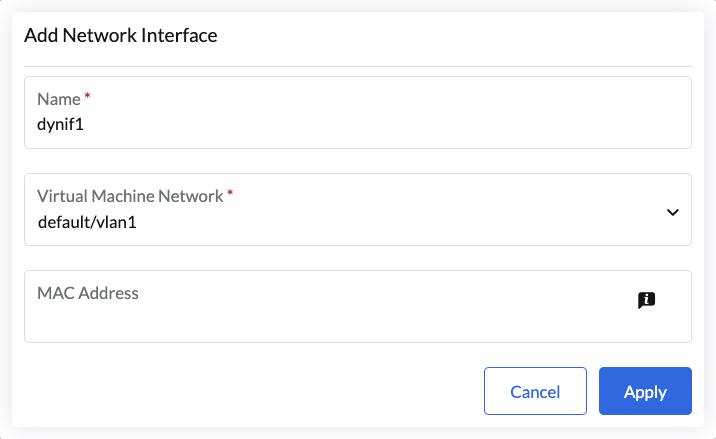
Specify a name for the network interface and select a virtual machine network.
You can select a VLAN network, an untagged network, or a VLAN trunk network.
-
Click Apply.
Harvester migrates the virtual machine and the specified interface is connected through bridge binding.
For information about limitations to the number of hotplugged interfaces, see Virtio Limitations in the KubeVirt documentation.
Hotunplug NICs from a Running VM
You can perform this action only when the following conditions are met:
- The virtual machine has at least two network interfaces. You cannot hotunplug the single remaining interface.
- The target interface is connected through bridge binding.
-
On the Harvester UI, go to the Virtual Machines screen.
-
Click the name of the target virtual machine, and then go to the Networks tab.

-
Locate the target interface, and then click Detach Network Interface.
Harvester migrates the virtual machine and detaches the interface.