CPU Model Selection
Available as of v1.8.0
Harvester lets you set a CPU model for each virtual machine. This is important for live migration to work in clusters with mixed CPU configuration.
Select a CPU Model
When creating or editing a VM, find the CPU Model field under the Advanced Options section.
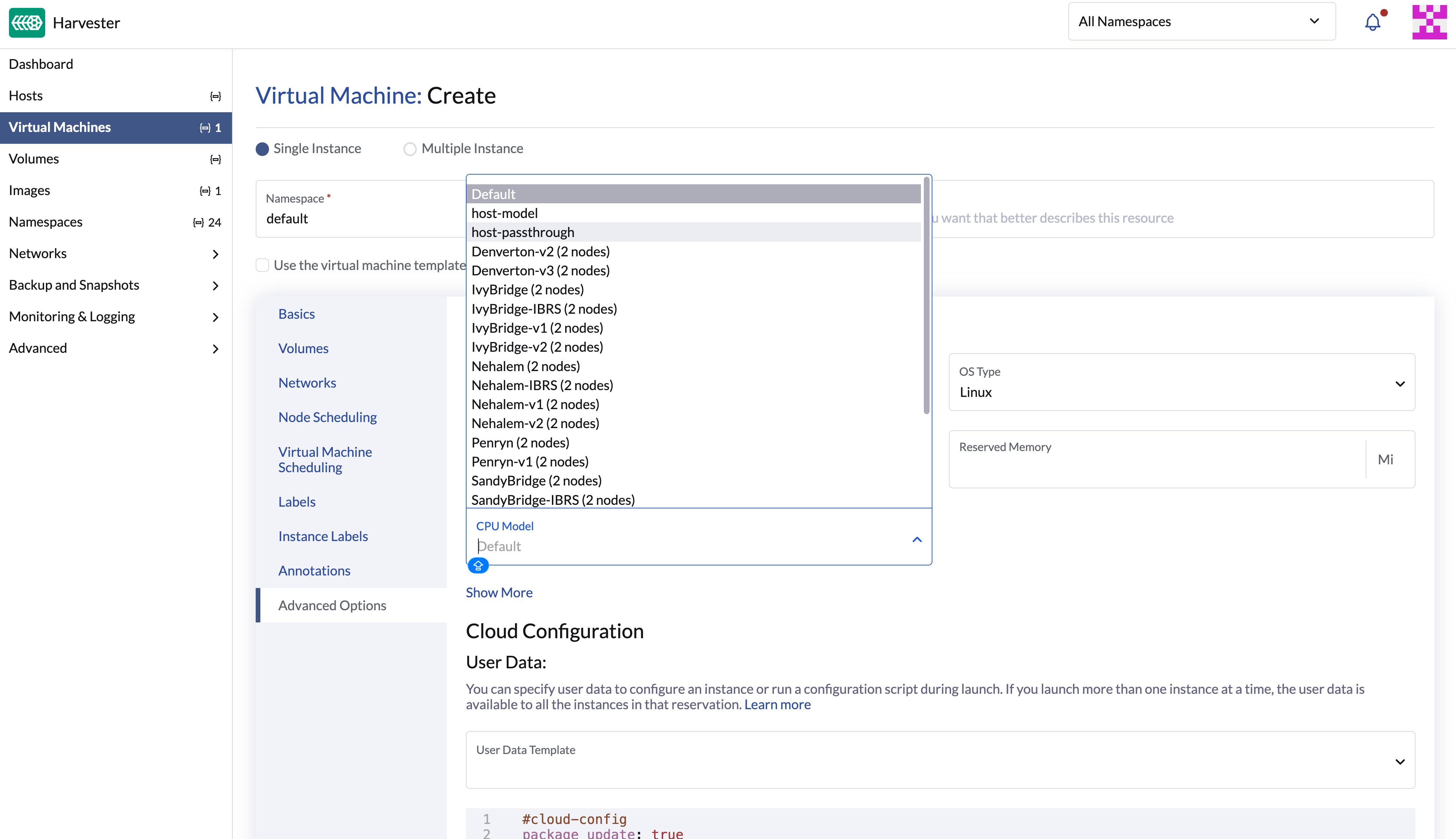
The following options are available:
| Option | Description |
|---|---|
| Default | Uses the cluster-wide CPU model set in the KubeVirt resource. If no cluster-wide model is set, this falls back to host-model. |
| host-model | Uses a CPU model based on the host node's capabilities. Works well when all nodes share the same CPU features, but might have live migration issues in mixed-CPU clusters. |
| host-passthrough | Passes the exact host CPU through to the VM. Gives the best performance but live migration to a target node with different CPU configuration is not possible. |
Named CPU model (e.g., IvyBridge, Cascadelake-Server) | Uses a specific CPU model defined by QEMU. This is the recommended option for clusters with mixed-CPU clusters. The dropdown list shows the available CPU models with the number of nodes that share that model — for example, IvyBridge (2 nodes) means two nodes in the cluster have the IvyBridge CPU model. |
Recommendations
- To ensure reliable live migration — whether your cluster has mixed or identical CPU generations — use a named CPU model instead of
host-modelorhost-passthrough. - Pick the most modern CPU model that every node in the cluster supports.
- Use the same CPU model on all VMs that need to live-migrate.
For more details on choosing a CPU model for live migration, including cluster-wide configuration and hardware examples, see Setting up a common CPU model for virtual machine migration.
Troubleshooting Live Migration Failures
If you use host-model and live migration fails — even in a cluster with identical hardware — the cause is usually node selector constraints that build up over time. Each time a VM migrates, KubeVirt adds CPU feature labels (such as cpu-feature.node.kubevirt.io/fpu: "true") to the VM pod's node selector. If a later target node is missing any of those labels, the migration will fail.
For steps to fix this — including rebooting the VM, setting a common CPU model, or adjusting node labels manually — see Troubleshooting VM Live Migration Issues Caused by Node Selectors.